

How To Create Sqlite Database In Python
Summary: in this tutorial, we will show you how to create tables in the SQLite database from the Python program using the sqlite3 module.
To create a new table in an SQLite database from a Python program, you use the following steps:
- First, create a
Connectionobject using theconnect()function of the sqlite3 module. - Second, create a
Cursorobject by calling thecursor()method of theConnectionobject. - Third, pass the
CREATE TABLEstatement to theexecute()method of theCursorobject and execute this method.
For the demonstration, we will create two tables: projects and tasks as shown in the following database diagram:
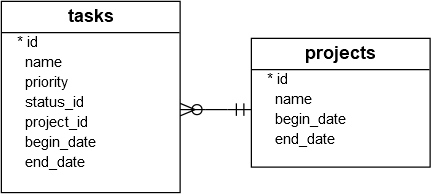
The following CREATE TABLE statements create these two tables:
Code language: SQL (Structured Query Language) ( sql )
-- projects table CREATE TABLE IF NOT EXISTS projects ( id integer PRIMARY KEY, name text NOT NULL, begin_date text, end_date text ); -- tasks table CREATE TABLE IF NOT EXISTS tasks ( id integer PRIMARY KEY, name text NOT NULL, priority integer, project_id integer NOT NULL, status_id integer NOT NULL, begin_date text NOT NULL, end_date text NOT NULL, FOREIGN KEY (project_id) REFERENCES projects (id) );
Let's see how to create new tables in Python.
First, develop a function calledcreate_connection() that returns a Connection object which represents an SQLite database specified by the database file parameter db_file.
Code language: Python ( python )
def create_connection (db_file): """ create a database connection to the SQLite database specified by db_file :param db_file: database file :return: Connection object or None """ conn = None try: conn = sqlite3.connect(db_file) return conn except Error as e: print(e) return conn
Second, develop a function named create_table() that accepts a Connection object and an SQL statement. Inside the function, we call the execute() method of the Cursor object to execute the CREATE TABLE statement.
Code language: SQL (Structured Query Language) ( sql )
def create_table(conn, create_table_sql): """ create a table from the create_table_sql statement :param conn: Connection object :param create_table_sql: a CREATE TABLE statement :return: """ try: c = conn.cursor() c.execute(create_table_sql) except Error as e: print(e)
Third, create a main() function to create the projects and tasks tables.
Code language: Python ( python )
def main (): database = r"C:\sqlite\db\pythonsqlite.db" sql_create_projects_table = """ CREATE TABLE IF NOT EXISTS projects ( id integer PRIMARY KEY, name text NOT NULL, begin_date text, end_date text ); """ sql_create_tasks_table = """CREATE TABLE IF NOT EXISTS tasks ( id integer PRIMARY KEY, name text NOT NULL, priority integer, status_id integer NOT NULL, project_id integer NOT NULL, begin_date text NOT NULL, end_date text NOT NULL, FOREIGN KEY (project_id) REFERENCES projects (id) );""" # create a database connection conn = create_connection(database) # create tables if conn is not None: # create projects table create_table(conn, sql_create_projects_table) # create tasks table create_table(conn, sql_create_tasks_table) else: print("Error! cannot create the database connection.")
Fourth, execute the main() function.
Code language: SQL (Structured Query Language) ( sql )
if __name__ == '__main__': main()
Here is the full program:
Code language: Python ( python )
import sqlite3 from sqlite3 import Error def create_connection (db_file): """ create a database connection to the SQLite database specified by db_file :param db_file: database file :return: Connection object or None """ conn = None try: conn = sqlite3.connect(db_file) return conn except Error as e: print(e) return conn def create_table (conn, create_table_sql): """ create a table from the create_table_sql statement :param conn: Connection object :param create_table_sql: a CREATE TABLE statement :return: """ try: c = conn.cursor() c.execute(create_table_sql) except Error as e: print(e) def main (): database = r"C:\sqlite\db\pythonsqlite.db" sql_create_projects_table = """ CREATE TABLE IF NOT EXISTS projects ( id integer PRIMARY KEY, name text NOT NULL, begin_date text, end_date text ); """ sql_create_tasks_table = """CREATE TABLE IF NOT EXISTS tasks ( id integer PRIMARY KEY, name text NOT NULL, priority integer, status_id integer NOT NULL, project_id integer NOT NULL, begin_date text NOT NULL, end_date text NOT NULL, FOREIGN KEY (project_id) REFERENCES projects (id) );""" # create a database connection conn = create_connection(database) # create tables if conn is not None: # create projects table create_table(conn, sql_create_projects_table) # create tasks table create_table(conn, sql_create_tasks_table) else: print("Error! cannot create the database connection.") if __name__ == '__main__': main()
Let's verify if the program has created those tables successfully in the pythonsqlite.db database.
First, launch the command line and connect to thepythonsqlite.db database:
>sqlite3 c:\sqlite\db\pythonsqlite.db

Then, use the .tables command to display the tables in the database.
Code language: CSS ( css )
sqlite> .tables projects tasks

As you can see clearly from the output, we are having the projects and tasks tables in the pythonsqlite.db database. And the program works as expected.
In this tutorial, you have learned how to create new tables in the SQLite database using the execute() method of the Cursor object.
Was this tutorial helpful ?
How To Create Sqlite Database In Python
Source: https://www.sqlitetutorial.net/sqlite-python/create-tables/
Posted by: ottthelver.blogspot.com
0 Response to "How To Create Sqlite Database In Python"
Post a Comment